01 / BACKUP
One conversation. Or all of them.
Save the chat you're in, or sync, select, and export your history in a batch. Skip unchanged conversations when backing up again.

Export, preserve, and own your AI conversations.
A permanent copy, on your terms.
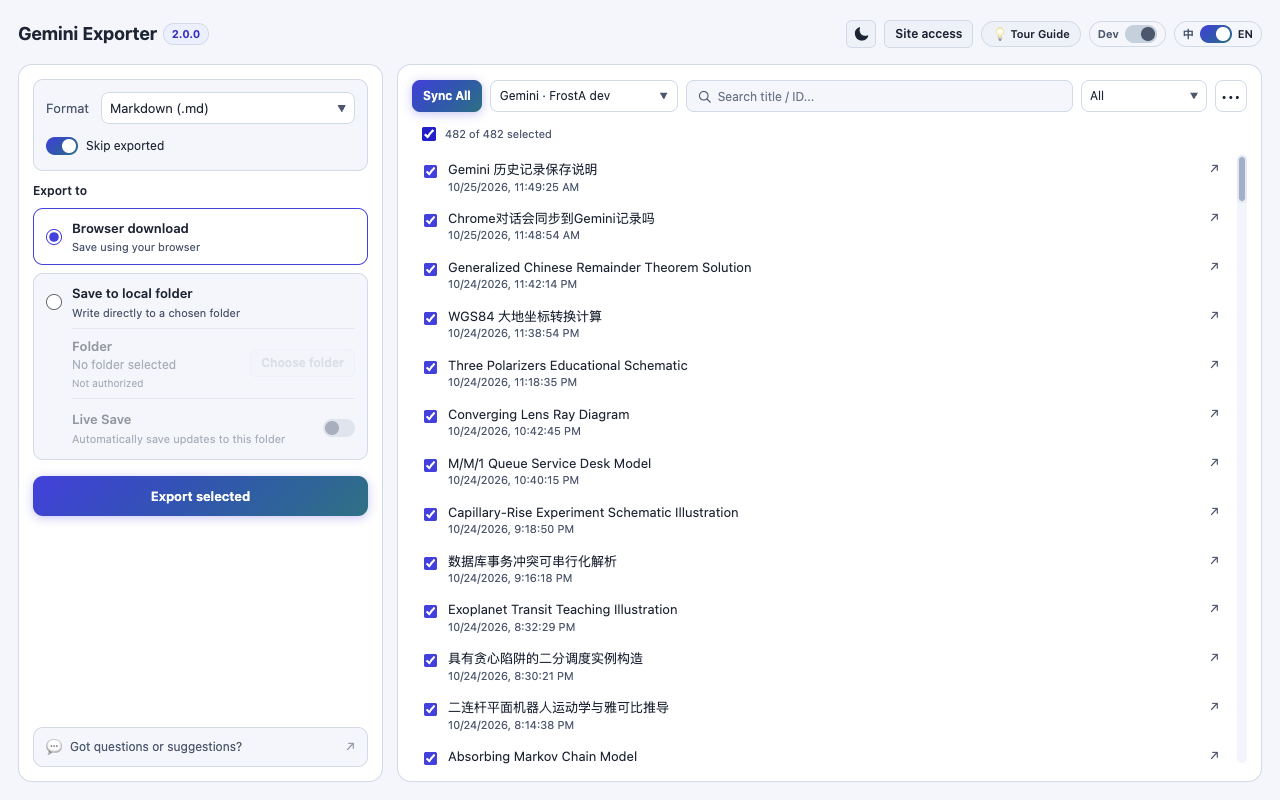
Actual extension screenshot captured in Chrome using a test account.
THE TOOLS YOU NEED
No screenshots. No copy-pasting endless chats. Just your conversations, saved how you want them.
Save the chat you're in, or sync, select, and export your history in a batch. Skip unchanged conversations when backing up again.
Readable, portable formats that don't depend on any one AI platform or special viewer.
Enable Live Save to keep Markdown copies up to date in a local folder as conversations change.
Import Google Takeout ZIP archives to complement conversations you can still access online.
PRIVACY IS THE DEFAULT
Your exports are processed locally in your browser. We don't operate a server to collect your conversations, and there's no telemetry or tracking built into the extension.
THREE SIMPLE STEPS
Add the free Chrome extension, then grant access to the AI platform you want to back up.
Open the workbench to sync your chats, review what's available, and choose what to keep.
Pick PDF, HTML, Markdown, or JSON. Download your files or save to a local folder.
MADE FOR REAL WORKFLOWS
Light and dark themes, export progress, retry tools, attachments when available, and clear status for every conversation.
Explore the user guide
GOOD TO KNOW
The published Chrome extension supports Google Gemini. ChatGPT, Claude, and Grok integrations are being developed and are experimental in source builds; they're not being advertised here as released features.
No. The extension processes your requested data on your device and stores exports locally. It uses your existing browser session to retrieve conversations from the AI platform itself, but does not send your conversations to a developer-operated service.
Export individual or multiple conversations to Markdown, HTML, PDF, or JSON. Available images and attachments are included where they can still be retrieved. Some expired attachments may no longer be accessible from the source platform.
Yes. There are no subscriptions, API keys, or accounts required for the extension. The source code is published on GitHub under the MIT License.
Yes. Live Save keeps Markdown backups updated in a local folder. You can also run incremental scans and skip unchanged conversations during batch export.
OWN YOUR CONVERSATIONS
Free to use. Open to inspect. Built to keep your data in your hands.
Add to Chrome